ERP without the implementation project.
Senate is an ERP for manufacturers, designed so that setup is not a project. Start from a working company, load your data by mapping the spreadsheets you already have, and pay per user. No consultants. No setup fee.
Self-serve · From $20 per user a month
- Setup fee USD
- 0
- Per user, per month USD
- 20
- Versions to maintain
- 1
- Account segments
- No limit
- Part no. (P)
- SENATE-ERP
10SetupSix design rules
The software was never the expensive part.
The setup was. We looked at where implementation budgets go and designed each cost out. Every decision answers one question: does this take setup and upkeep work off the customer?
| No. | How ERP usually goes | How Senate is designed | Today |
|---|---|---|---|
| 01 | A blank system that consultants configure for months. | Start from a working companyA new company begins from a starter, or from blank. The starter brings a chart of accounts, fiscal calendar, posting rules, eight roles, and quote and invoice templates. Change any of it, or start over and upload the chart of accounts you use today. | General manufacturing starter in the build. Automotive and CPG starters in development |
| 02 | Structures that lock at the first posting, so they must be perfect up front. | Nothing important locksAccount segments are separate values on every journal line. Add a segment after go-live and the journals already posted are untouched. | In the build |
| 03 | Data migration sold as a partner project. | Map, preview, importUpload the export you already have, match its columns to fields, see which rows would fail and why, then import. A re-run never creates a second copy. | CSV and Excel, with a mapping screen, in the build. More records in development |
| 04 | Customisation that forks the product and breaks on upgrade. | Extend beside the coreFields, lists and layouts are configuration, not code. There is no customer fork, so there is nothing to re-test or re-pay for at each release. | Added fields and dropdown lists in the build. Form layouts planned |
| 05 | Tax content and EDI plumbing rebuilt for each customer. | Connect what changes by law or by networkTax rates, EDI transport and exchange rates come from specialist providers behind one replaceable interface. We build the business logic; they keep the content current. | Tax and EDI interfaces in the build. Providers not connected yet |
| 06 | Every screen, permission and report wired by hand. | One catalog drives everythingNavigation, permissions, search and agent tools read the same server catalog. A new function is one entry that appears everywhere at once. | In the build |
20Any sizeSimple by default
One person or a whole plant.
The same product runs a one-person shop and a multi-site plant. It starts simple. Stricter controls are settings that start off, and you turn them on as you grow.
- 01
Start free, then one seat
Explore every module in a demo company you can reset. When you are ready, one $20 Core seat runs the business.
Launch pricing
- 02
You approve your own agent
When an agent prepares a journal, you approve it yourself in the app. Nobody else has to.
In the build
- 03
Order review starts off
New orders go straight to open. Turn on order review and each new order waits for a reviewer first.
In the build
- 04
Periods close when you say
Ledger periods stay open until you close them. Set a number of days and each period soft closes on its own after it ends.
In the build
- 05
A second approver, when you need one
Requiring a second person to approve is designed as a company setting that starts off.
Planned
30ProductScreens from the current build
From the order
to the ledger.
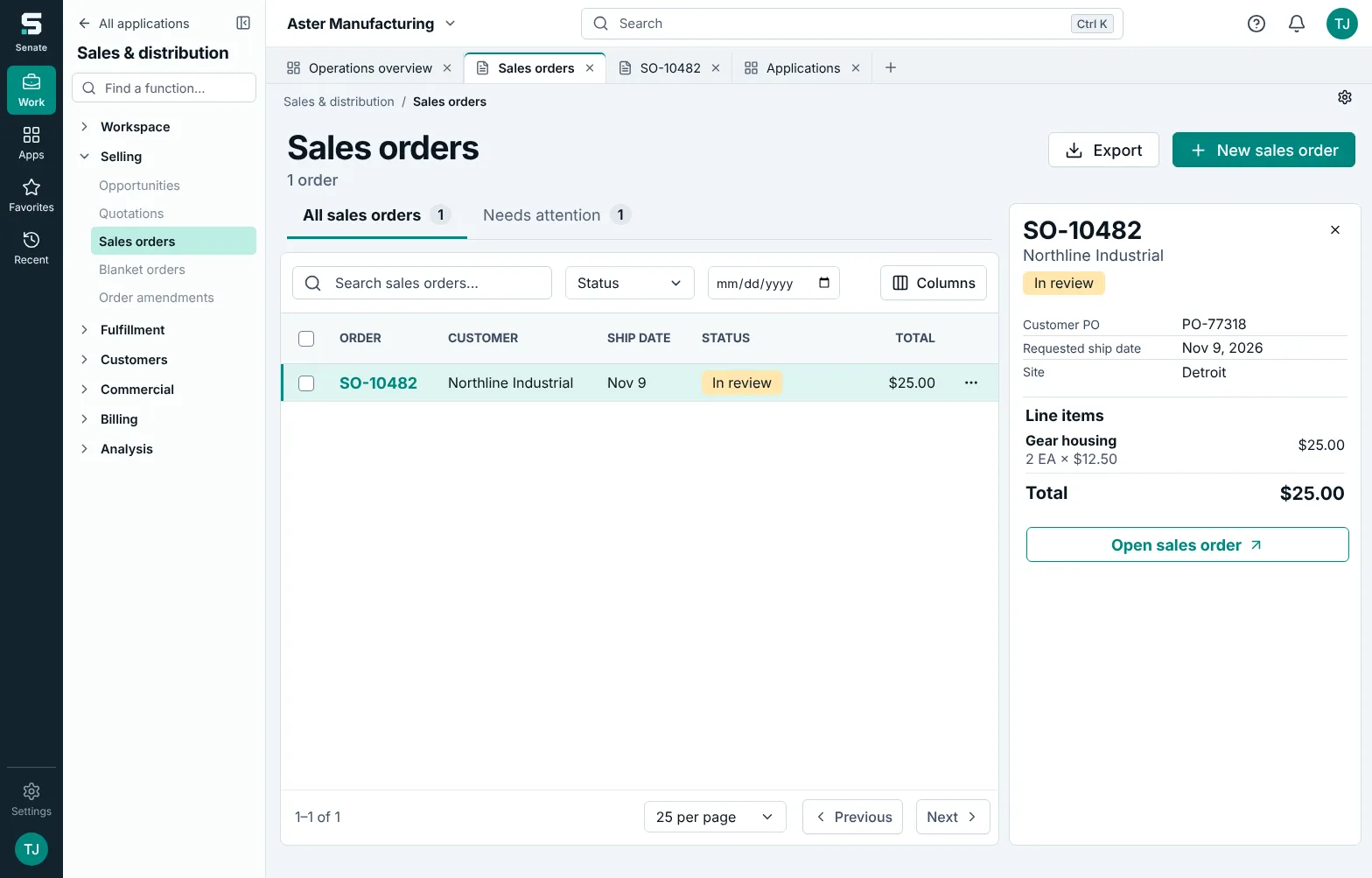
Sales
An order and everything that happened to it.
Entry, review, attachments and export sit on one screen. Totals come from the server, so the number on the list is the number in the ledger. Every change is in the audit trail.
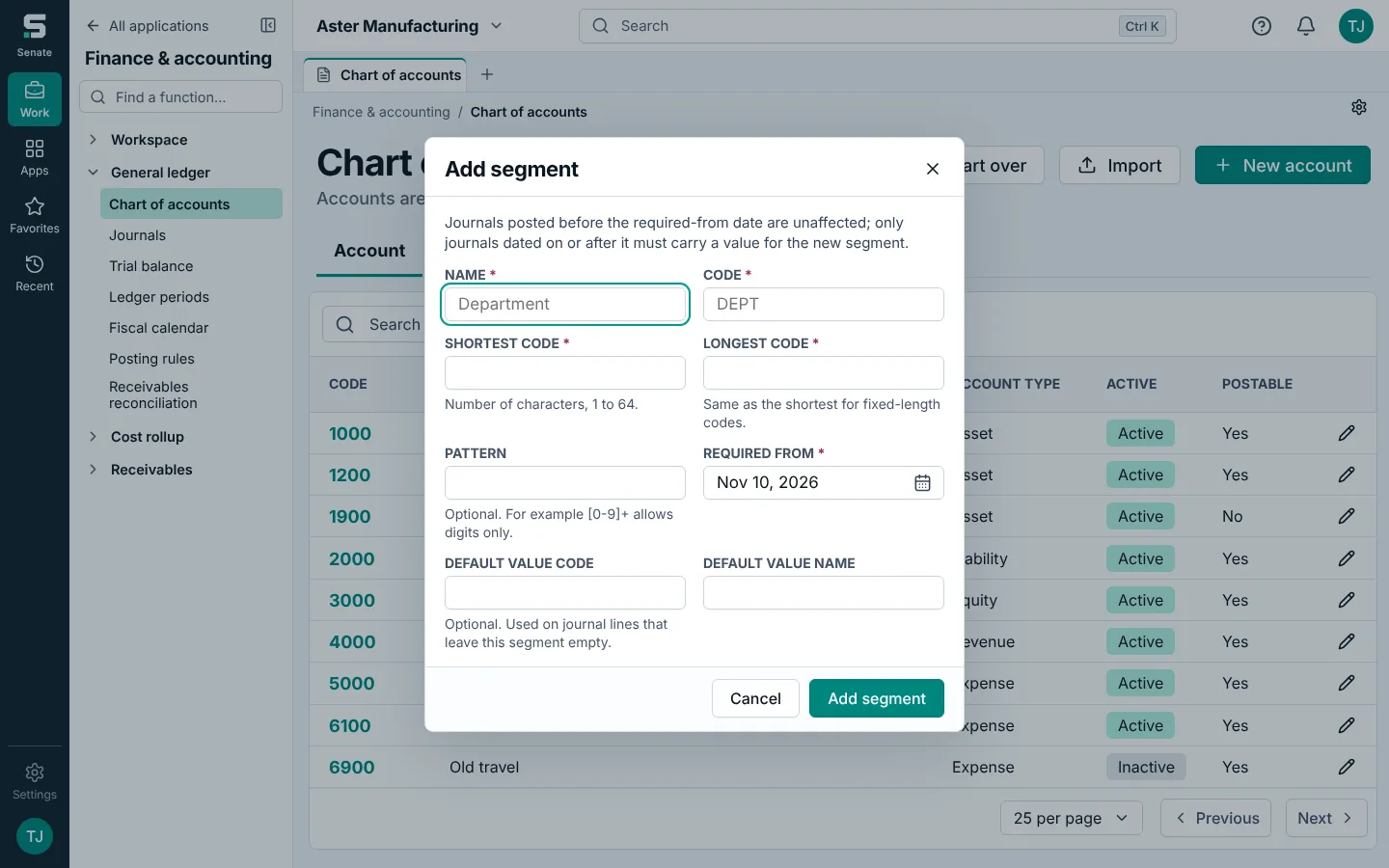
General ledger
A ledger you can change your mind about.
Most systems freeze the chart structure at the first posting. Here a segment is added from one dialog with the date it applies from. Journals posted before that date are unaffected. There is no limit on how many segments you have or how they are formatted.
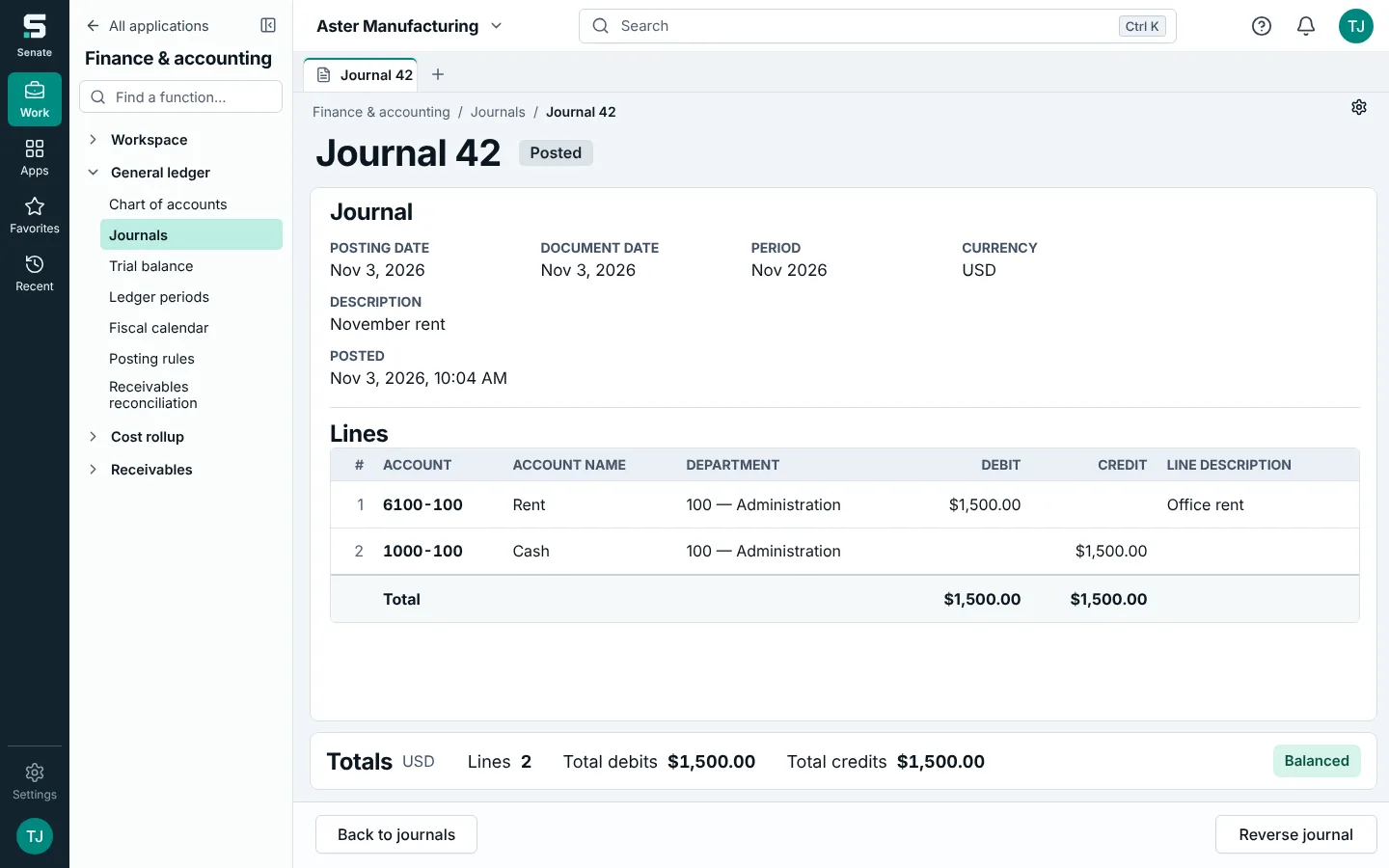
Controls
Posted means permanent.
Journals, stock movements and audit entries are append-only. A correction is a linked reversal and a new entry, never an edit. Amounts keep their currency and are rounded in one place.
40Architecture
One command.
Every way in.
A click, an API call, an agent, a spreadsheet row and a triggered event all reach the same business command and pass the same checks. There is no back door to keep in sync.
Any of these
- A screenThe browser app
- An API callREST, with an OpenAPI contract
- An agentA governed tool call
- An import rowA mapped file
- An eventA trigger or workflow
Reaches one command
inventory.
Business rules live here and nowhere else.
Which always
- AuthorizesUser, company, site, record and field, checked on the server.
- DeduplicatesA retry returns the first result, never a second record.
- Checks the versionA stale edit is refused, not silently overwritten.
- Commits onceThe change, its audit entry and its event, in one transaction.
One action, three ways.
Releasing the planned orders from an MRP run. The screen, the API and an agent all reach the same command and pass the same checks.
01 The screen
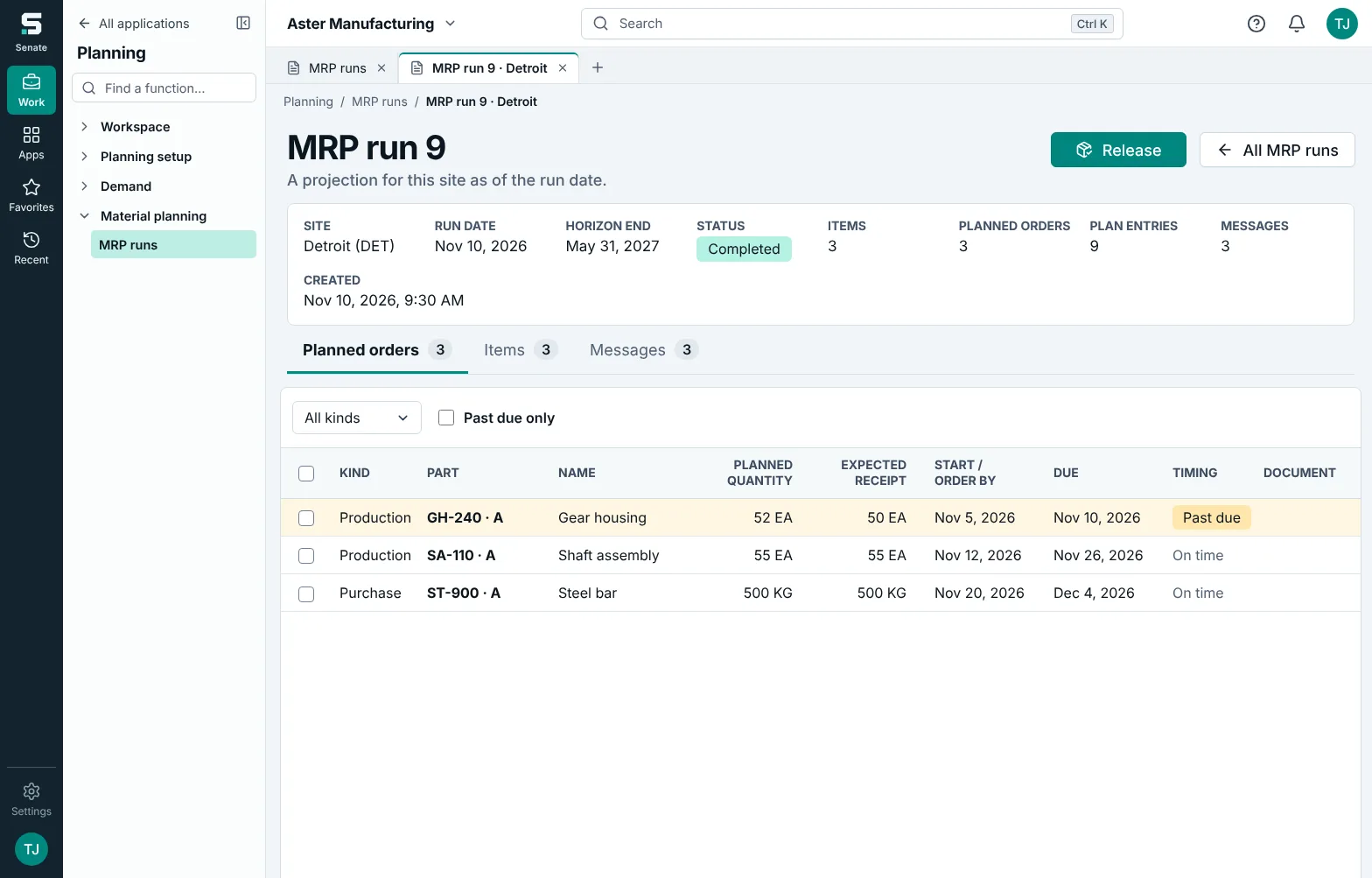
Fig. 5Tick the planned orders, then Release. 02 The API
POST /api/v1/planning/mrp-runs/9/planned-orders/release
X-Company-Id: 1
Idempotency-Key: release-run-9

{ "planned_order_sequences": [1, 2, 3] }
REST, with the company in a header and a key that makes a retry safe.
03 An agent
tools/call planning.mrp_planned_orders.release
X-Company-Id: 1
X-MCP-Delegation-Id: 41

{
  "idempotency_key": "release-run-9",
  "mrp_run_id": "9",
  "planned_order_sequences": [1, 2, 3]
}
A tool call inside a task you gave it. The company is never an argument.
Each way checks the same permission at the site, returns the first result on a retry, and releases all the orders or none.
50Agents
AI that asks
before it posts.
- 01
It acts as you, never as more than you
Every tool call runs under a verified user or a time-boxed delegation, with the same company, site, record and field limits as the app.
- 02
It prepares. Someone else approves
An approval binds to the exact draft it was given for. The person who asked cannot approve it, and no tool counts as a signature.
- 03
It is audited, and it cannot post twice
Identity, task limits and a duplicate guard travel with each action into the audit trail. A retry replays the first result.
- How agents are governed
- 09:14:02Taylor JacksonAsks an agent to cover the shortage on SO-10482.
- 09:14:03Agent, as Taylorsales.orders.shortageBRKT-2210 is 400 EA short.
- 09:14:05Agent, as Taylorinventory.transfers.prepareDraft transfer, Toledo to Detroit. Write budget 1 of 1 used.
- 09:14:05SenateDraft waits for approval. No stock has moved.
- 09:15:30Taylor JacksonTries to approve. Refused: the proposer cannot approve this transfer.
- 09:22:41Morgan LeeApproves this exact draft. The approval lasts 15 minutes.
- 09:23:10SenateTransfer dispatched. The approval is used up and cannot be reused.
60Build status
What is built.
What is not.
Senate is in development. This is the build as it stands, module by module, so you know what you would be signing up for.
| Module | In the build today | Next | State |
|---|---|---|---|
| Finance & accounting | Chart of accounts, Journals, Posting rules, Ledger periods, Fiscal calendar, Trial balance, Customer invoices, Customer payments, Receivables reconciliation, Standard cost rollup | Payables, Budgets, Fixed assets | In the build |
| Customer relationships | Customers, Deals, Quotes, Activities and follow-ups, Sales reports | Contacts, Customer hierarchy, Price lists | In the build |
| Sales & distribution | Sales orders, Order attachments, Shipments, Invoices from shipments, Customer schedules and releases, Running totals, Ship notices | Blanket orders, Returns, Credit notes | In the build |
| Procurement | Suppliers, Supplier parts and prices, Purchase orders | Receipts, Requisitions | In development |
| Planning | Demand forecasts, Part planning, Customer planning, Working calendar and hours, MRP runs, Planned order release, Finite capacity schedule | People's time off in the schedule | In the build |
| Manufacturing | Bills of material, Steps, Machines, areas and crews, Work orders, Operator control center, Production, scrap and time reporting, Maintenance orders and planned upkeep | Label printing, Make-to-order options | In the build |
| Quality | Quality plans and controls, Checks on the operator screen, Cleaning, Holds, Problems and actions | FMEA, Part approval (PPAP), HACCP plans | In the build |
| Inventory & warehouse | Inventory transfers, Standard-cost valuation, Containers and lots with statuses | Stock counts, Lot traceability, Warehouse management | In development |
| People | Nothing yet | People list, Skills and training, Time off, Timesheets | In development |
| Integration | REST API (OpenAPI), Business events (CloudEvents), CSV and Excel import with a mapping screen, Data export, Webhooks, EDI through a provider | Configurable triggers, EDI provider connection, Tax connector | In the build |
| Administration | Companies, roles and people, Added fields, Dropdown lists, Record statuses, Terminology and translations, Document templates, Approvals, Record history, Document search, Settings page | Form layouts | In the build |
70IndustriesBuilt first for two kinds of plant
Automotive suppliers
Releases that change daily, labels the customer dictates and traceability that has to hold up in an audit. Standard cost, MRP and a ledger that agree with each other.
For automotiveConsumer packaged goods
Fast lines, many SKUs and retailers who each want data their own way. Forecast-driven planning, with an API and events on every module.
For CPG80PricingLaunch pricing, per user, per month
Priced like software, not like a project.
Create an organization, add seats, start working. No sales call. No setup, implementation or maintenance fees.
Free
$0
to explore
Explore the whole product in a seeded demo company you can reset.
Core
$20
per user / month
The full ERP for the people who run the business every day.
AI
$100
per user / month
Everything in Core, plus agents that work under your identity.
Bring a customer export.
Join the early-access list. We load your customers from the file you already have, and you see the product with your own data in it.